Bygg og deploy
Løsningen er satt opp til å bruke Miljødirektoratets eksisterende byggeserver med TeamCity og Octopus Deploy.
TeamCity
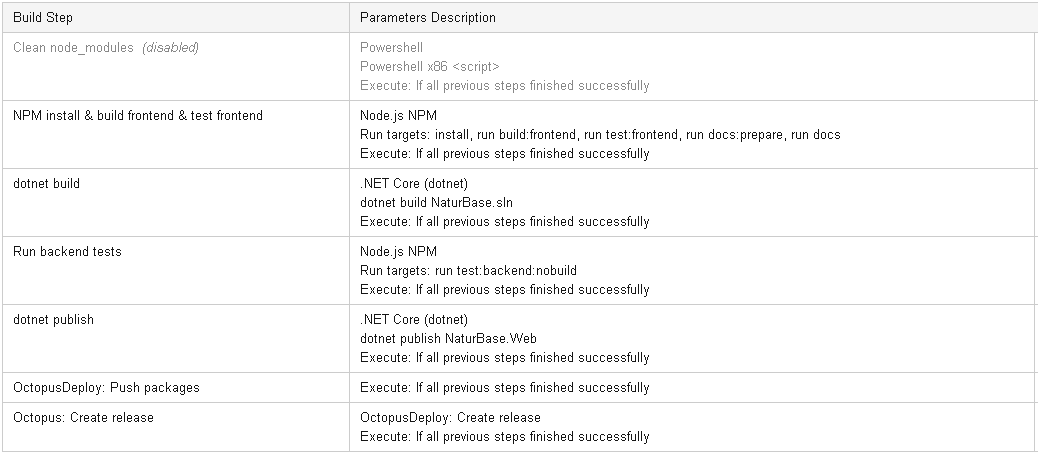
TeamCity er satt opp med følgende byggesteg:
Octopus Deploy
Deploy-prosessen har bare ett steg, av typen Deploy NuGet Package, men med flere innstillinger:
- IIS Deployment Type: IIS Web Site
- IIS Web Site:
- Create or update an IIS Web Site and Application Pool: true
- Physical path: Package installation directory
- IIS Application Pool:
- .NET CLR version: No Managed Code
- Identity: Application Pool Identity
- Start Mode: IIS Application Pool and IIS Web Site
- IIS Bindings:
- http port 80
- https port 443
- Authentication modes: Anonymous
- Post-deployment script:
Add-WebConfiguration system.webServer/aspNetCore/environmentVariables "IIS:\sites\$IIS_WebSite" -Value @{name="ASPNETCORE_ENVIRONMENT"; value="$ASPNETCORE_ENVIRONMENT"}
- JSON Configuration Variables:
appSettings.json**/*.config.json
Alle konfigurasjonsvariabler settes i Octopus Deploy, se Konfigurasjon for mer info.
Driftsetting
- Når bygget er vellykket i TeamCity, trigges automatisk deploy i Octopus til InternalTest-miljøet.
- Releases får versjonsnummer basert på byggenummeret i TeamCity.
- Releases kan deployes til andre miljø (Test eller Produksjon) manuelt, ved å velge en release, og trykke f.eks. Promote to Test eller Deploy to...
- OBS: Vær oppmerksom på at det er variablene som gjaldt da releasen ble laget som gjelder. M.a.o., hvis man ønsker å deploye en versjon med endrede variabler, må man Create Release før man deployer.